The RAM Crushing Prices : Time to Switch to DDR5
2026 is shaping up to be downright brutal for anyone looking to build or upgrade a PC. The component market is in a state of volatility I haven't seen since the 2021 GPU crisis. I've spent these last few months watching RAM pricing curves with an anxiety that just keeps growing : DDR5 prices are surging again, and analysts are leaving no doubt about the trend. It's exactly in this context that an unexpected anomaly just popped up on Amazon : the Crucial DDR5 Pro Overclocking 32GB 6000MHz kit dropped to $454.75 (389.99 €). End of life, inventory liquidations, Prime delivery. That seriously deserves our attention.
Our Quick Take on the Crucial DDR5 Pro 32GB
🕹️ Score : 9/10
A high-frequency kit engineered by Micron, highly reliable and versatile, whose end of production triggers a historic price drop. Hard to beat under $500 for 32GB DDR5 right now.
For whom : demanding gamers and creators wanting to secure 32GB of high-frequency memory before prices skyrocket for good.
Current price : $454.75 / 389.99 € (lowest price in the last 30 days : $488.57)
Thermal Design and Performance : What is this Crucial kit really worth?
A heatsink designed for demanding builds
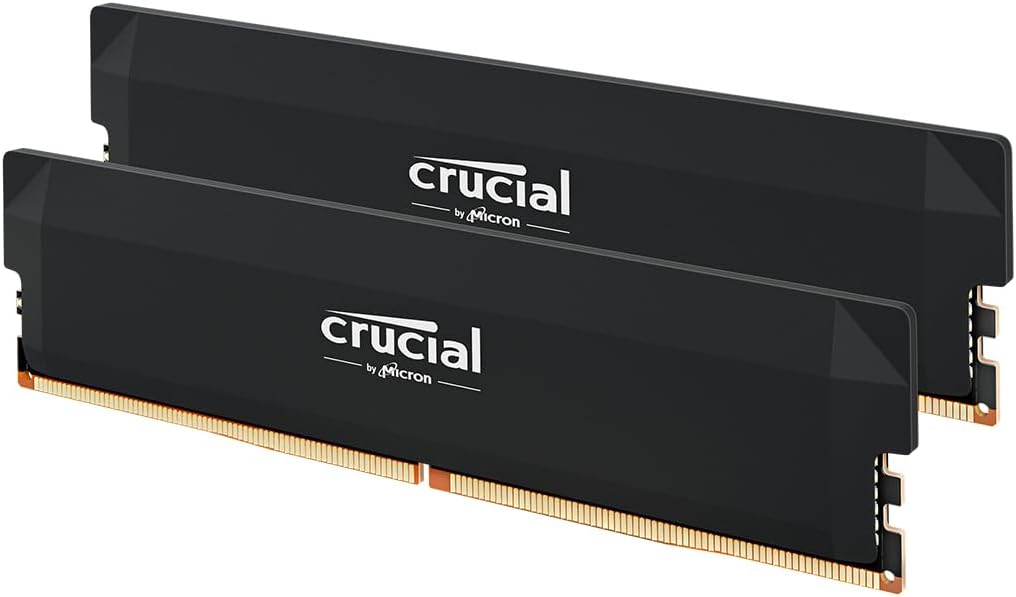
Micron means 45 years of expertise in manufacturing memory components. Hardly an unknown player. And you feel it right out of the box : the kit sports a black aluminum heatsink featuring a geometric origami-inspired design. Beyond its cosmetic appeal, it dissipates heat highly efficiently. The profile remains stealthy and blends seamlessly into any build, gamer or not.
Size-wise, you will face zero compatibility issues with massive air coolers : the height is well-controlled, standing in stark contrast to RGB kits that refuse to coexist with a good old Noctua. Long story short, it's remarkably well thought out.
6000MHz CL36 : why this exact configuration is the right one
The raw numbers : 6000MHz, CL36 latency, 1.35V voltage. It might sound abstract, ultimately resulting in an overall latency reduction of about 25% compared to entry-level DDR5 standards. In-game, this translates to smoother gameplay and a tangible FPS boost on memory-stressing titles, especially CPU-heavy ones like simulations or dense open worlds.
The 6000MHz frequency is also the absolute sweet spot for Intel and AMD platforms : beyond that, marginal gains struggle to justify the extra cost, while dropping below means leaving performance on the table. Crucial clearly targeted the perfect bandwidth for the best price-to-performance ratio.
Intel AND AMD compatible : the massive advantage of this kit
What makes this Crucial particularly compelling is its native dual compatibility : it features both Intel XMP 3.0 (12th Gen Core and newer) and AMD EXPO (Ryzen 7000 and beyond) profiles. Basically, you plug it in, activate the profile in the BIOS, and your memory runs straight at 6000MHz with zero manual tweaking. Pure plug-and-play.
That's a detail that truly matters, particularly if you plan on swapping platforms eventually. You keep your kit, taking it directly to your next build.
💡 BIOS Tip : Once the kit is installed, boot into the BIOS and activate the XMP (Intel) or EXPO (AMD) profile right on the first startup. Without this step, the sticks default to 4800MHz, making you miss out on 25% of free performance.
Where to buy at the best price : why the urgency is very real
A price history that speaks for itself
Here are the real numbers, verified on the pricing history : last January, this exact 32GB kit was flying off shelves at $725. Over the last six months, it hovered around $500 to $580. Today, the end-of-life promotion drops it down to $454.75, a massive 22% below MSRP. That is the lowest recorded price on this model since the RAM crisis began.
⚠️ Why this price drop is temporary : Crucial has permanently stopped production of this specific SKU. The available stock on Amazon is the very last of it. Once sold out, the reference vanishes from the new market. The successor kits will arrive right in the middle of a chip shortage, inevitably pushing retail prices higher.
The DDR5 market context in 2026
The global semiconductor crisis is heavily impacting us again. Memory chip production capacities are under massive strain, inventories are melting, and demand (driven notably by the AI boom and 5G) shows zero signs of slowing down. In this environment, waiting to buy your DDR5 RAM literally means gambling on a price drop that has zero reason to happen anytime soon. Our deep dive into the RAM shortage and its consequences for PC gamers breaks it all down if you want to dig deeper.
Getting your hands on Micron hardware under $500 for 32GB of high-frequency DDR5 is a rare opportunity. The quality-to-price ratio right now is objectively hard to beat on the current market.
Comparison : this kit versus the 32GB DDR5 competition
| 32GB DDR5 Kit | Frequency | Latency | Observed Price | XMP/EXPO | Score /10 |
|---|---|---|---|---|---|
| ⭐ Crucial DDR5 Pro 6000 | 6000 MHz | CL36 | $454.75 | XMP 3.0 + EXPO | 9/10 |
| Corsair Vengeance DDR5 6000 | 6000 MHz | CL36 | ~$499 | XMP 3.0 (EXPO rare) | 8/10 |
| Kingston FURY Beast 6000 | 6000 MHz | CL40 | ~$539 | EXPO only | 7.5/10 |
| G.Skill Trident Z5 6000 | 6000 MHz | CL30 | ~$659 | XMP 3.0 | 8.5/10 |
The chart speaks for itself : at 6000MHz CL36, the Crucial stands currently as the cheapest in its class, with the massive added bonus of dual XMP/EXPO compatibility that the competition rarely offers at this price point. The G.Skill Trident Z5 offers a tighter CL30 latency, requiring a significantly higher budget and dropping native EXPO support.
The right time to complete your rig
The Crucial DDR5 Pro Overclocking 32GB kit combines a 6000MHz frequency, refined thermal dissipation, and universal Intel/AMD compatibility, making it extremely versatile on any recent build. Micron delivers a component with proven reliability and a massive track record behind it. And at $454.75, it's hitting its all-time low in a market clearly refusing to trend downward.
If your rig is still running DDR4 and you are hesitating to make the jump, or if you are building a new PC and looking for the best memory for your budget, this clearance sale represents the best opportunity you'll get in 2026. Once the inventory is gone, it's over for this SKU.
What about you, are you still on DDR4 or did you already make the leap ? Is your current setup starting to show its limits on the latest releases ? Tell me everything in the comments, I read it all.
Frequently Asked Questions about DDR5 RAM in 2026
Is DDR5 really mandatory in 2026 ?
If you are building a new PC today with an Intel Core 12th Gen platform or higher, or AMD Ryzen 7000 and beyond, DDR5 is the native standard. DDR4 remains compatible on certain Intel 12th/13th Gen motherboards, resulting in leaving performance on the table. For recent setups, DDR5 is a must-have.
Does this Crucial kit work on AMD Ryzen 7000/9000 ?
Yes, and that is precisely one of the product's main selling points. The AMD EXPO profile is built-in natively. You activate the profile in your AM5 motherboard's BIOS, getting stable 6000MHz right away without any extra tweaking.
Will DDR5 prices drop in 2026 ?
That is the million-dollar question. Analysts universally agree on an upward trend throughout 2026, fueled by AI demand, data centers, and shrinking production capacities. Promotional windows like this one are strictly temporary anomalies to grab while you can. They represent a rare exception in the current market trend. Our deep dive on the RAM shortage and its impacts covers this context thoroughly.
Is it better to buy 32GB or 64GB in DDR5 for gaming ?
For gaming in 2026, 32GB remains the absolute sweet spot : no current title requires more, making an upgrade to 64GB a massive extra cost for zero in-game performance gain. The saved budget is much better invested in a faster GPU or SSD. The situation might evolve around 2027-2028 with the next generation of games, making 32GB the right call today.
How do I check if my RAM is running at 6000MHz after installation ?
The easiest way : CPU-Z (free, lightweight, reliable). Launch it, head to the "Memory" tab, and check the "DRAM Frequency" value. It should read 3000MHz (meaning 6000 MT/s in DDR, which stands for Double Data Rate). If you see 2400 or 2400MHz, go back into the BIOS and activate the XMP/EXPO profile.
💡 Join the community !
Want to discuss PC builds, hardware deals, or just find some friends to play with ? Join us on the Little Big Campus Discord 👾